 CalorieLog Pro
How to log meals with Claude or ChatGPT
CalorieLog Pro is a calorie diary you can fill by talking to your AI assistant. Tell Claude or ChatGPT what you ate, or show it a photo, and each item lands in your diary with its calories, protein, carbs and fat. The app also works on its own: the AI part is optional.
1. Connect your AI app (about 2 minutes)
Claude: open Settings → Connectors → Add custom connector. Name it CalorieLog Pro, paste
https://calorielogpro.com/mcp as the URL, leave the other fields empty and save. Click Connect,
sign in with Google (the first time, this creates your free account), choose read-only or read-and-write access,
and allow.
ChatGPT: adding a connector by URL needs developer mode, which you turn on in ChatGPT's settings. Then add a new app with the same URL and sign in the same way.
Other AI apps that support MCP connectors follow the same steps. The technical details are in the connector documentation.
2. Log a meal by typing
You: Breakfast was 2 eggs, toast with butter and a coffee with milk. Lunch: a chicken caesar wrap and an apple.
The assistant logs all six items in one go, each under the right meal, with its best estimate. It doesn't ask before logging: it logs first, then asks about anything unclear. Times stay blank unless you give them, so your diary never shows a time you didn't eat.
3. Log from a photo
Send a photo of your plate, a restaurant receipt or a handwritten list of the day. Each item becomes an entry. A vague line such as "snack at work" becomes a placeholder with a short question, so your day's total is roughly right now and exact later.
4. Fix the vague entries later
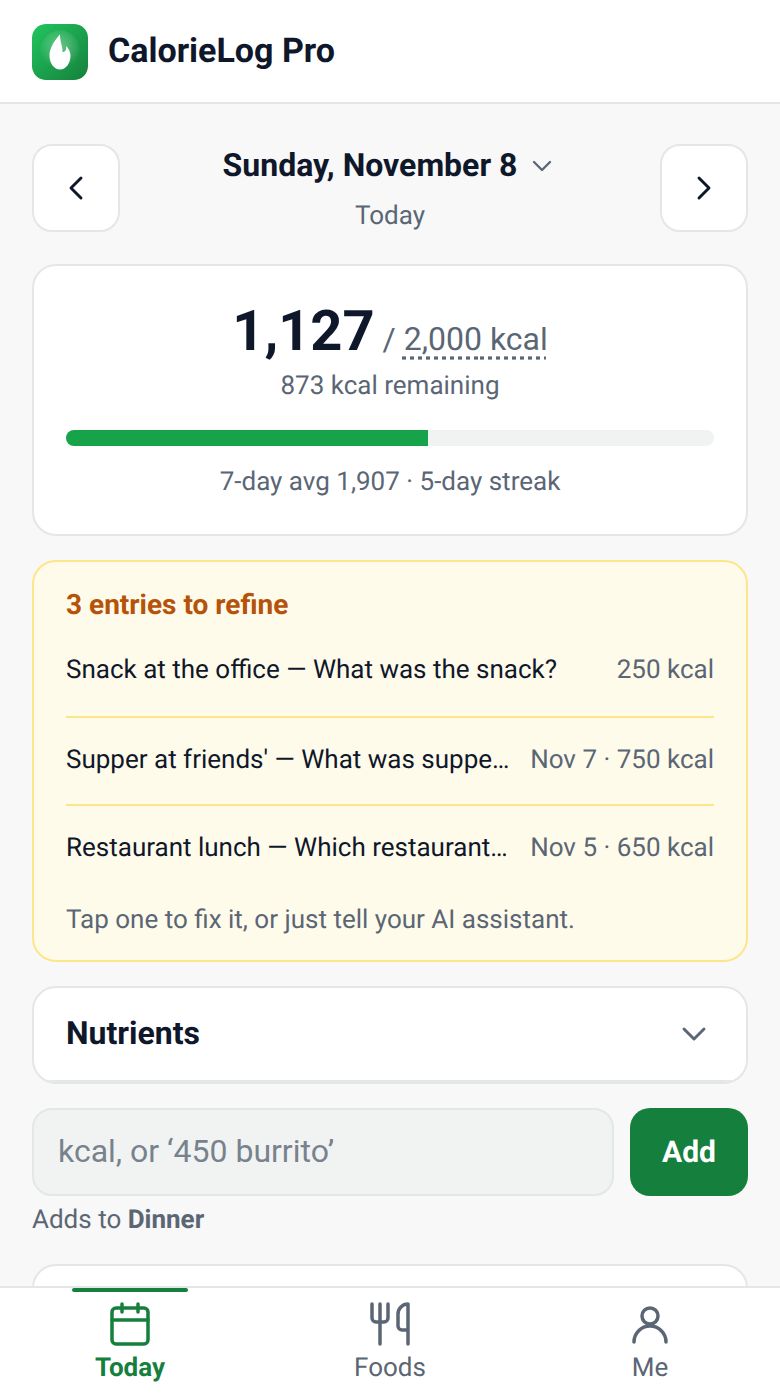
Placeholders show in a yellow card on the Today screen. Ask your assistant "What's left to fix?": it asks about each one and updates them all at once. You can also tap an entry in the app and fix it yourself.
5. Teach it your shortcuts
When you explain something once, for example "my usual is Greek yogurt with granola, about 320 kcal", the assistant saves it as a food with that nickname. The next time you say "my usual", it uses your numbers without asking.
6. Ask about your week
Questions like "How did I do this week?" get your average per logged day, the days you logged, the days at or under your goal, and your current streak. The assistant changes your goal only when you ask it to.
What it can and can't do
- It reaches only your own diary, never anyone else's.
- It records what you ate. It doesn't give diet plans, weight-loss targets or medical advice.
- To stop it, open Me → AI assistant access in the app and tap Disconnect. Access ends at once.
- Exporting your data and deleting your account are only in the app (Me). See how to delete your account.
Prefer not to use AI?
Everything works in the app alone. Type a number or something like 450 burrito in the box on the Today screen and tap Add, or pick from your saved foods under Foods.